Monday, March 8, 2010

Blogger Templates: Crafty Cart

Crafty Cart cute 2-column Blogger XML Template

Crafty Cart is a cute and adorable Blogger template with 2-Column layout, light color scheme & beautiful header area. It is an ideal theme for personal and kids related blogs.

Features: clean Blogger templates, 2 columns Blogger templates, colorful Blogger templates, top menu, rss, left sidebar, white Blogger templates.


Sunday, March 7, 2010

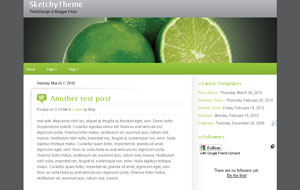
Blogger Templates: SketchyTheme

SketchyTheme Green 2-Column Blogger XML Template

SketchyTheme is a 2-Column Blogger template with a top menu and simple yet great color scheme.

Features: clean Blogger templates, 2 columns Blogger templates, top menu, white, nature Blogger templates.


Wednesday, March 3, 2010

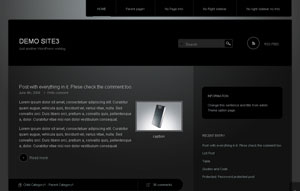
Blogger Templates: Piano Black

Piano Black Blogger Template

Piano Black is a gorgeous & sexy dark theme with top menu, a beautiful header and 2 columns. Originally designed for Wordpress by mono-lab and converted to Blogger by me.

Features: premium Blogger templates, top menu, dark Blogger templates, black Blogger templates.


Friday, February 19, 2010

Blogger Templates: Simple China

Simple China Blogger Template

Simple China is a very beautiful theme by Alexander Tumanov. You can customize all fonts and colors by just going to "Fonts & Colors" tab.

Features: 2 columns, travel, china, rss, top menu, xml, blogspot.


Monday, February 15, 2010

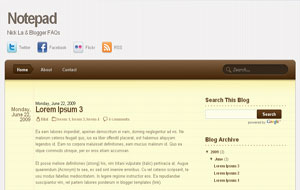
Blogger Templates: Notepad

Notepad Blogger Template

Notepad is a very clean and neat template originally designed and coded for Wordpress by Nick La and I've just finished converting it to Blogger.

Features: 2 columns, premium, yellow, brown, rss, top menu, twitter, xml, blogspot, search, social bookmarking icons.


Tuesday, December 29, 2009

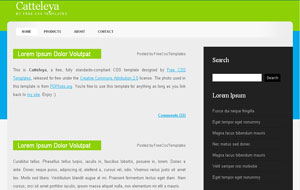
Blogger Templates: Catteleya

Catteleya Blogger Template

Just saw this really simple but elegant theme at one of my favorite sites Free CSS Templates. So, here it is for you guys in Blogger format.

Features: 2 columns, green, top menu, css, black, xml, blogspot, dark.


Monday, December 28, 2009

Blogspot How To: Create a Beautiful Header Using Patterns

Patterns are small images which can repeat in the background. They are small in size and create an awesome background. In this simple tutorial, I'll show you how you can add a pattern in your header background to make it more beautiful and eye-catching.

Steps


1- Find a free pattern of your choice from some quality site like DinPattern.

2- The patterns might come as a .zip file. Extract the .zip file through 7-Zip and then upload the pattern on Blogger (Need Help?) and get the address/URL of that image.

3- Go to Design and then Edit HTML tab. Find this code:

#header-wrapper {
width:660px;
margin:0 auto 10px;
border:1px solid $bordercolor;
}


4- Now, you can add the background pattern in the above code. To do that, change the above code with the following one:

#header-wrapper {
width:660px;
margin:0 auto 10px;
border:1px solid $bordercolor;
background: url(Paste the address of the pattern you uploaded in Step 2 here);
}


I've uploaded a sample pattern to demonstrate the result. The code for my example is:

#header-wrapper {
width:660px;
margin:0 auto 10px;
border:1px solid $bordercolor;
background: url(http://www.dinpattern.com/tiles/indian-summer.gif);
}


And the result is something like this:


Need My Help?


If you can't find the above code or have some other problem, feel free to leave me a comment.